Top bar

- Left (
TopBar.tsx) — toggle the sidebar (Ctrl+Shift+B), switch to Claude Chat, and open Memory (project memory). - Center (
CommandPalette.tsx) — the global command palette, opened withCtrl+Shift+P(⌘⇧Pon macOS); it searches every action, skill and session. - Right
- Changes (
Ctrl+Shift+G) — Git changes in the working tree, line-by-line diffs, an AI commit message writer and a PR tool. - Report (
Ctrl+Shift+X) — exports every command in the session, with durations, exit codes and agent events, as Markdown, HTML or JSON. - Help (
F1) — the interactive in-app guide (GuideModal.tsx).
- Changes (
Sidebar
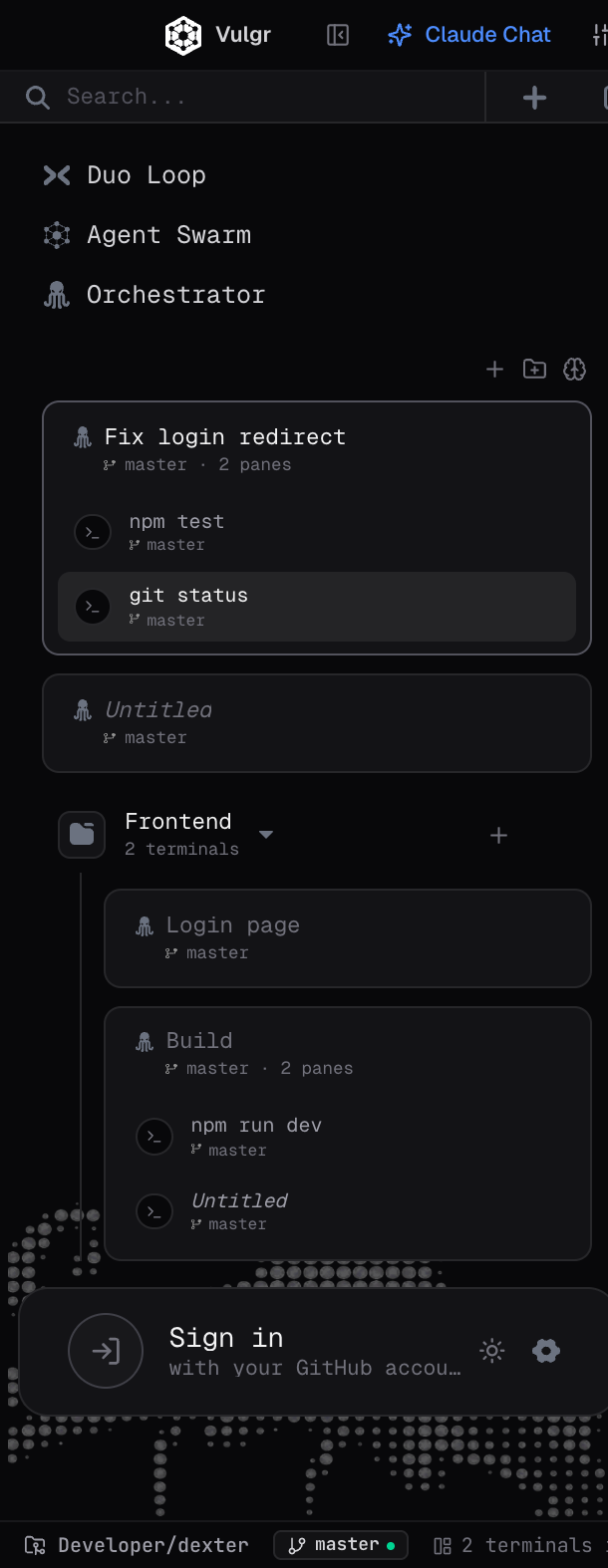
Multi-agent launchers
Sidebar.tsx offers three modes:
- Duo Loop — a live two-pane agent loop.
- Agent Swarm — a background network of three agents (Builder, Verifier, Auditor).
- Orchestrator — splits big goals into subtasks and runs them in parallel.
Sessions and groups
- Tabs name themselves after the command running in them (e.g.
npm test,git status); you can rename them and drag them into groups (e.g. aFrontendgroup). - Each pane of a split tab is listed separately in the tree.
- When you reopen the app, every tab and group comes back where you left it.
Profile and update card
At the bottom left (ProfileCard.tsx): sign in with GitHub, switch light/dark theme, open settings (Ctrl+,), and a one-click update icon that appears when a new version is ready.